

CatchLight
A private back office for photographers, on iPhone, iPad and Mac.
I’m building CatchLight for photographers like me. It’s the back office next to the gallery platform you already use: your clients, your shoots, what you’ve been paid and what you’ve spent, and the poses you keep meaning to try.
It isn’t on the App Store yet.
This evening in Frisco, Texas,
- Golden hour
- Sunset
- Twilight
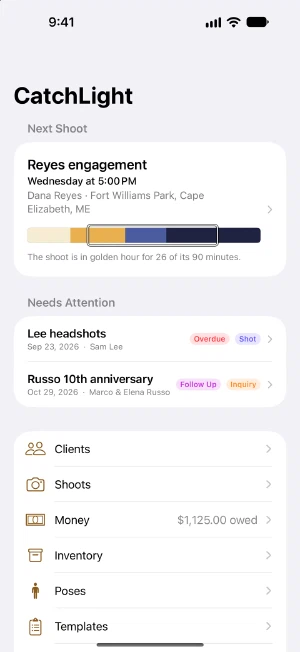
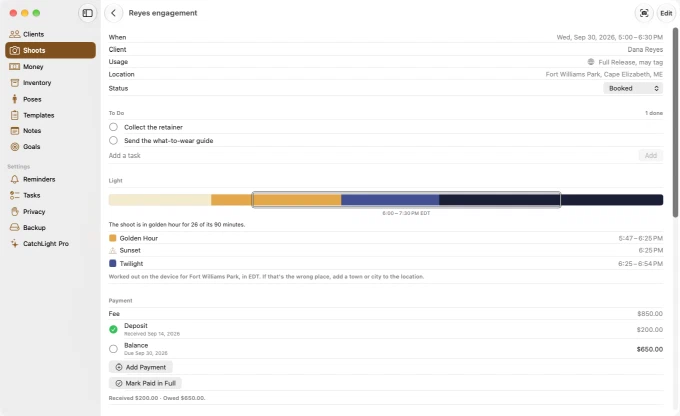
That’s this evening’s light where I shoot, drawn the way CatchLight draws it for every shoot: for the place you typed and the date you set, in that place’s own time zone. Drag the session along it.
What it keeps
Shoots
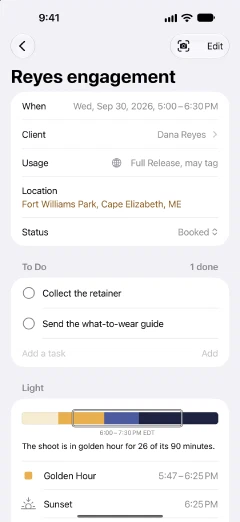
Date, place and fee, each deposit and balance to the day it arrives, the gallery link and the date you promised it, what the client agreed their photos can be used for, and a to-do list for each stage.
Clients
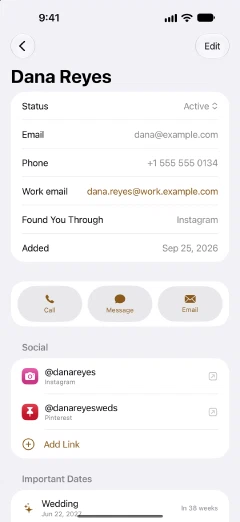
Every email, phone number and social profile, birthdays and anniversaries, how they found you, and every shoot you’ve done for them. Bring them in from Contacts, a CSV or a vCard.
Money
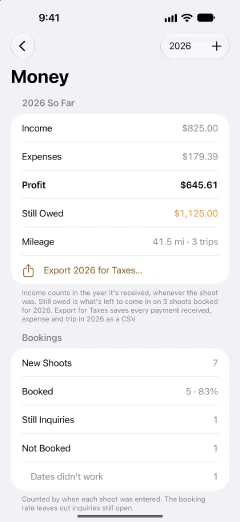
Income by the date it actually arrived, expenses with receipt photos, and mileage. The year’s profit, what’s still owed, how many inquiries booked, and one spreadsheet for your accountant.
Poses
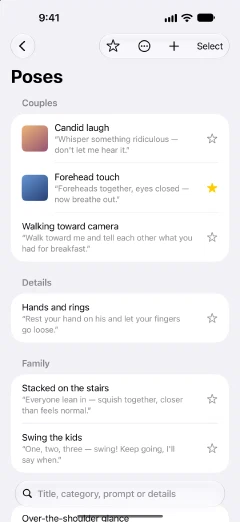
Your own library, each pose with up to five reference photos and the line to say out loud. Start from packs for couples, families, seniors and headshots, then build each shoot’s checklist from it.
And the rest
- Inventory
- Cameras, lenses, lights and the stock you keep on hand, with serial numbers read off a photo of the label, warranties, photos and prices. The total your insurer asks for, as a spreadsheet.
- Reminders
- The evening before a shoot, a payment due, an inquiry gone quiet, a gallery due, an anniversary coming up. Booked shoots can sit on a CatchLight calendar beside your own.
- Templates
- Start a shoot with its usual poses, gear list and fee already on it.
- Mini-sessions
- Split a day into timed slots and book it client by client.
- Private when it needs to be
- Lock CatchLight behind Face ID, Touch ID or your Mac’s password. Mark a client Discreet and their name stays off notifications, the calendar and the Lock Screen.
- Save from anywhere
- Found a pose worth keeping? Save to CatchLight is in the share sheet wherever the photo is, and it lands on the pose you pick.
- Notes and goals
- Notes for anything that isn’t a shoot, and the goals you set for the year.
- Siri and Shortcuts
- Ask what your next shoot is, add an expense or log a payment without opening the app.
On the day
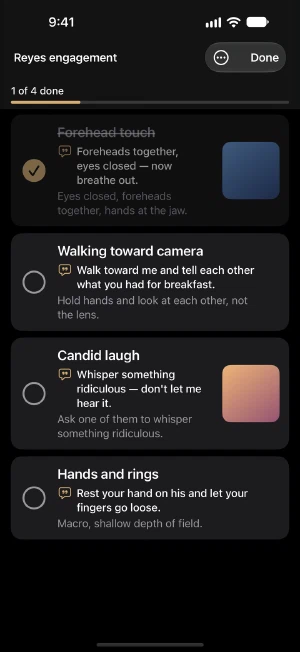
Session mode puts the shoot’s pose checklist full screen, with the reference photo and what to say for each pose, on a dark screen that won’t glare at dusk. The screen stays awake. On iPhone the Lock Screen keeps the elapsed time and the next pose while you’re in the camera.
On your home screen
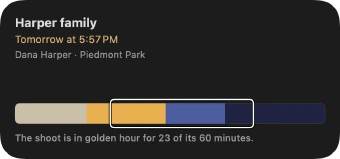
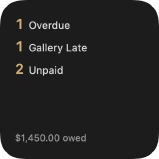
Two widgets. One is the next shoot: when and where it is, and the light it falls in. The other counts what’s waiting on you, with what you’re owed underneath. A client you’ve marked Discreet shows as Session and nothing else, so a name doesn’t sit on your Lock Screen where anyone can read it.
On your Mac
The same app on a bigger screen, with the same clients and shoots. Your iPhone, iPad and Mac stay in step through your own iCloud account.
Your data stays yours
No account, no server of mine, no analytics. Everything lives on your devices and syncs between your iPhone, iPad and Mac through your own iCloud account. I can’t see your clients, your shoots or your photos. It all works with no signal. You can export everything at any time, as plain JSON plus your photos as regular JPEGs.
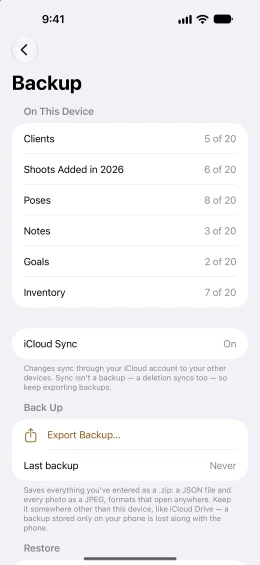
The flip side: I can’t get anything back for you, and sync isn’t a backup, since a deletion syncs too. Make a backup from Settings › Backup now and then, and keep the file somewhere safe.
Price
Every feature is free. The free plan only caps how much you can add: 20 clients, 20 new shoots a year, 20 poses, 20 templates, 20 notes, 20 goals and 20 inventory items. Expenses and mileage are never capped, and past years never count against this one. CatchLight Pro lifts every cap for $19.99 a year.
Help#
Email me at catchlight@amerkhalid.com. Tell me which device you’re on, its iOS or macOS version, and what happened. A screenshot helps a lot. I read everything, even if it takes me a few days to write back.
Subscriptions go through Apple. Cancel CatchLight Pro any time from your Apple Account’s subscriptions, or from CatchLight Pro inside the app. Refunds are Apple’s call too, at reportaproblem.apple.com. Canceling never touches your data. Everything you’ve added stays.
Privacy. Read how CatchLight handles your data.